Where RAG Fails: A Practical Guide to Building and Breaking Retrieval-Augmented Generation with JavaScript

Ask a large language model a question about your company's internal policy document, and it will confidently make something up. Not because it is broken, but because it was never trained on that document in the first place. This single gap, the space between what a model knows and what you need it to know, is the reason Retrieval-Augmented Generation exists.
RAG is one of the most talked about patterns in applied AI right now, and for good reason. It lets you bolt real, current, private knowledge onto a general-purpose LLM without retraining anything. But RAG is not magic, and it is not a guarantee of correctness. This post covers both sides of that coin: how to build a working RAG pipeline in JavaScript, and, just as importantly, where and why RAG breaks down in practice.
The Problem RAG Was Built to Solve
Before touching any code, it helps to understand why RAG needed to exist at all.
A base LLM has three hard limitations:
Frozen knowledge. It only knows what was in its training data, up to a certain cutoff date. Anything newer simply does not exist for it.
No access to private data. It has never seen your company's internal wiki, your product's support tickets, or your personal notes.
A tendency to guess. When an LLM does not know something, it does not usually say "I don't know." It generates the most statistically plausible answer, which can sound completely confident and be entirely wrong.
Imagine asking a brilliant new hire, on their very first day, a detailed question about your company's refund policy. They have no access to your internal docs, so they will either say "I don't know" (rare) or make an educated guess that sounds right but isn't (common). RAG is the equivalent of handing that new hire the actual policy document before they answer.
What RAG Actually Is
Retrieval-Augmented Generation is a technique where, before the LLM generates a response, the system retrieves relevant pieces of information from an external knowledge source and inserts them into the model's context. The model then answers using both its general training and this freshly retrieved information.
The core idea in one sentence: retrieve first, then generate.
The Basic RAG Pipeline
At a high level, a RAG system follows four steps:
User Query → Retrieval → LLM (Query + Retrieved Context) → Response
Here is a more detailed breakdown as a Mermaid diagram placeholder:
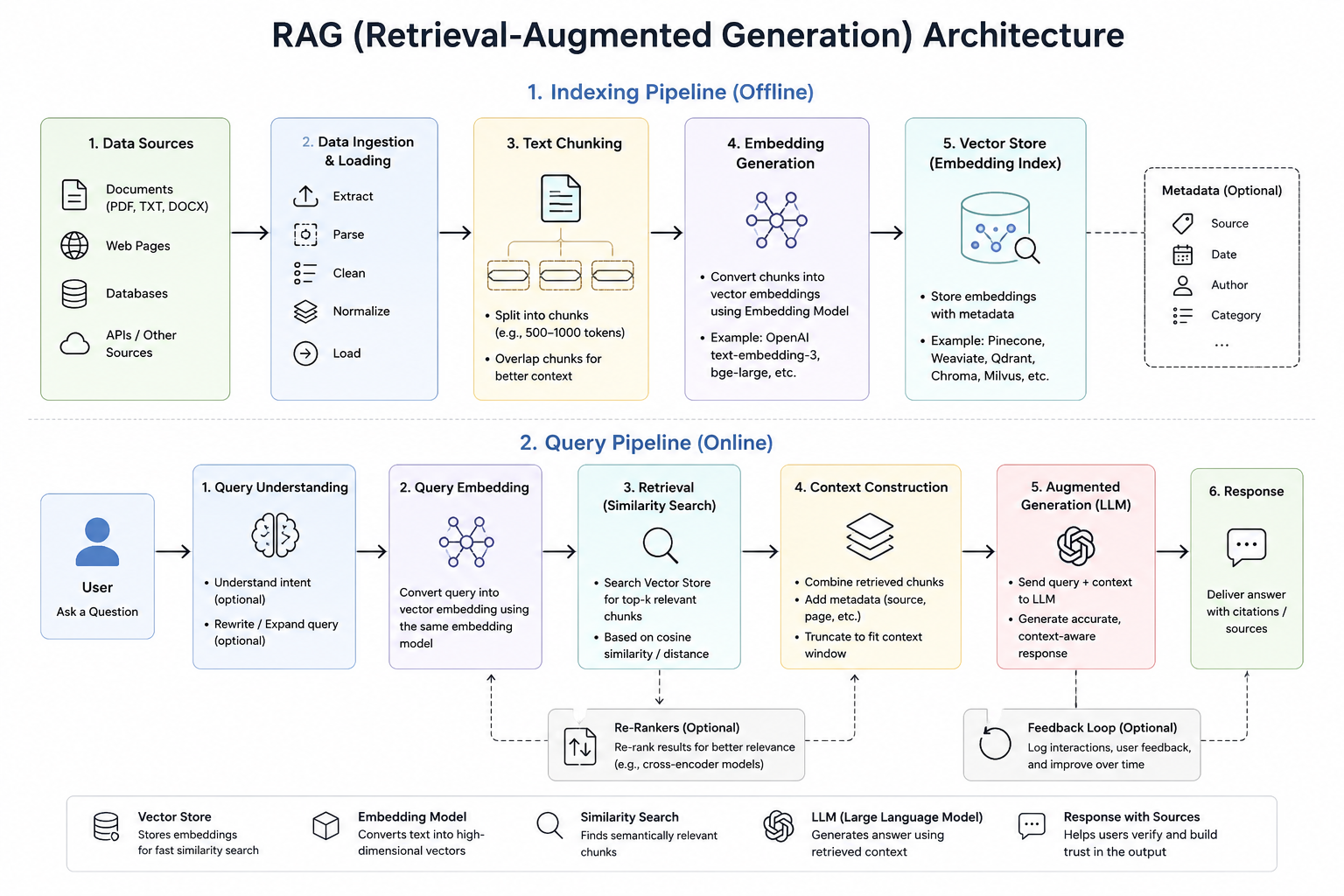
Diagram note: Show a left-to-right flow with five stages.
(1) A document icon labeled "Knowledge Base" feeding into
(2) a "Chunking" step that splits it into smaller text blocks, feeding into
(3) an "Embedding Model" that converts each chunk into a vector, stored in
(4) a "Vector Database." Below this pipeline, show a separate "User Query" box that also passes through the same embedding model, then arrows into the Vector Database to represent a similarity search. The top matches flow into
(5) an "LLM" box alongside the original query, which outputs a final "Response" box. Use a dark background with cyan-to-indigo gradient arrows to keep it visually consistent with a modern dev-tool aesthetic.
flowchart LR
    A[Knowledge Base] --> B[Chunking]
    B --> C[Embedding Model]
    C --> D[(Vector Database)]
    E[User Query] --> F[Embedding Model]
    F --> D
    D -->|Top-K Relevant Chunks| G[LLM]
    E --> G
    G --> H[Response]
Walking through it step by step:
Chunking: Your source documents (PDFs, markdown files, support tickets, whatever) are split into smaller pieces, typically a few hundred tokens each.
Embedding: Each chunk is converted into a vector, a list of numbers that captures its semantic meaning, using an embedding model.
Storage: These vectors are stored in a vector database that supports fast similarity search.
Retrieval: When a user asks a question, the question itself is embedded the same way, and the database returns the chunks whose vectors are closest in meaning.
Augmentation: Those retrieved chunks are inserted into the prompt sent to the LLM, alongside the original question.
Generation: The LLM produces an answer grounded in the retrieved text, instead of relying purely on its training data.
Why JavaScript for AI?
There is a persistent myth that serious AI work has to happen in Python. That was true a few years ago. It is not true anymore.
Modern JavaScript tooling has closed most of the gap:
LangChain.js brings the same chaining, retrieval, and agent abstractions from the Python ecosystem directly into Node and edge runtimes.
LlamaIndex.ts offers strong data-indexing and retrieval primitives for TypeScript projects.
Vercel AI SDK gives you streaming, tool calling, and provider-agnostic model access with a few lines of code.
Native fetch and edge runtimes mean a RAG API route can run comfortably inside a Next.js app, right next to your existing frontend, with no separate Python microservice required.
If your product already lives in a Node or Next.js stack, building RAG in JavaScript means one language, one deployment pipeline, and one team, instead of stitching a Python service onto a JS frontend.
Step-by-Step Implementation
The following code chunks walk through a minimal but production-shaped RAG pipeline in modern JavaScript, using ES modules and async/await throughout.
Chunk 1: Document Loading and Text Splitting
// documentLoader.js
// Loads raw text documents and splits them into overlapping chunks
// suitable for embedding. Overlap preserves context across chunk boundaries.

import { readFile } from "node:fs/promises";

/**
 * Splits a large text into overlapping chunks.
 * @param {string} text - The full source text.
 * @param {number} chunkSize - Max characters per chunk.
 * @param {number} overlap - Characters shared between consecutive chunks.
 * @returns {string[]} Array of text chunks.
 */
function splitIntoChunks(text, chunkSize = 800, overlap = 100) {
  const chunks = [];
  let start = 0;

  while (start < text.length) {
    const end = Math.min(start + chunkSize, text.length);
    chunks.push(text.slice(start, end).trim());
    // Move the window forward, but step back by "overlap" to preserve context
    start += chunkSize - overlap;
  }

  return chunks.filter(Boolean);
}

/**
 * Loads a document from disk and returns its chunks with metadata.
 * @param {string} filePath - Path to the source document.
 */
export async function loadAndChunkDocument(filePath) {
  const rawText = await readFile(filePath, "utf-8");
  const chunks = splitIntoChunks(rawText);

  // Attach metadata so we can trace an answer back to its source later
  return chunks.map((content, index) => ({
    id: `${filePath}-chunk-${index}`,
    source: filePath,
    content,
  }));
}
Chunk 2: Generating Embeddings and Storing Them in a Vector Database
// embedAndStore.js
// Converts text chunks into embeddings and stores them in a vector database.
// This example uses OpenAI for embeddings and a generic vector store interface
// (swap in Pinecone, Weaviate, or pgvector as needed).

import OpenAI from "openai";

const openai = new OpenAI({ apiKey: process.env.OPENAI_API_KEY });

/**
 * Generates an embedding vector for a single piece of text.
 * @param {string} text
 * @returns {Promise<number[]>}
 */
async function embedText(text) {
  const response = await openai.embeddings.create({
    model: "text-embedding-3-small",
    input: text,
  });

  return response.data[0].embedding;
}

/**
 * Embeds a batch of document chunks and upserts them into the vector store.
 * @param {Array<{id: string, content: string, source: string}>} chunks
 * @param {object} vectorStore - Any store exposing an `upsert` method.
 */
export async function embedAndStoreChunks(chunks, vectorStore) {
  const vectors = [];

  for (const chunk of chunks) {
    const embedding = await embedText(chunk.content);

    vectors.push({
      id: chunk.id,
      values: embedding,
      metadata: {
        content: chunk.content,
        source: chunk.source,
      },
    });
  }

  // Batch upsert keeps this efficient for larger document sets
  await vectorStore.upsert(vectors);
  console.log(`Stored ${vectors.length} chunks in the vector database.`);
}
Chunk 3: Querying the Database and Feeding Context into an LLM
// queryRag.js
// Takes a user question, retrieves the most relevant chunks,
// and asks the LLM to answer using only that retrieved context.

import OpenAI from "openai";

const openai = new OpenAI({ apiKey: process.env.OPENAI_API_KEY });

async function embedText(text) {
  const response = await openai.embeddings.create({
    model: "text-embedding-3-small",
    input: text,
  });
  return response.data[0].embedding;
}

/**
 * Retrieves the top matching chunks for a query and generates an answer.
 * @param {string} question - The user's natural language question.
 * @param {object} vectorStore - Vector store exposing a `query` method.
 * @param {number} topK - Number of chunks to retrieve.
 */
export async function answerWithRag(question, vectorStore, topK = 4) {
  // Step 1: embed the incoming question the same way documents were embedded
  const questionEmbedding = await embedText(question);

  // Step 2: retrieve the most semantically similar chunks
  const results = await vectorStore.query({
    vector: questionEmbedding,
    topK,
  });

  const retrievedContext = results
    .map((match) => match.metadata.content)
    .join("\n---\n");

  // Step 3: build a grounded prompt that explicitly limits the model
  // to the retrieved context, reducing (not eliminating) hallucination risk
  const systemPrompt = `You are a helpful assistant. Answer the user's question
using ONLY the context provided below. If the answer is not contained in the
context, say you don't have enough information, instead of guessing.

Context:
${retrievedContext}`;

  const completion = await openai.chat.completions.create({
    model: "gpt-4o-mini",
    messages: [
      { role: "system", content: systemPrompt },
      { role: "user", content: question },
    ],
  });

  return completion.choices[0].message.content;
}
Wired together, these three files form a complete, minimal RAG pipeline: load and chunk your documents, embed and store them once, then query and generate on every user request.
Visualizing the Data Flow
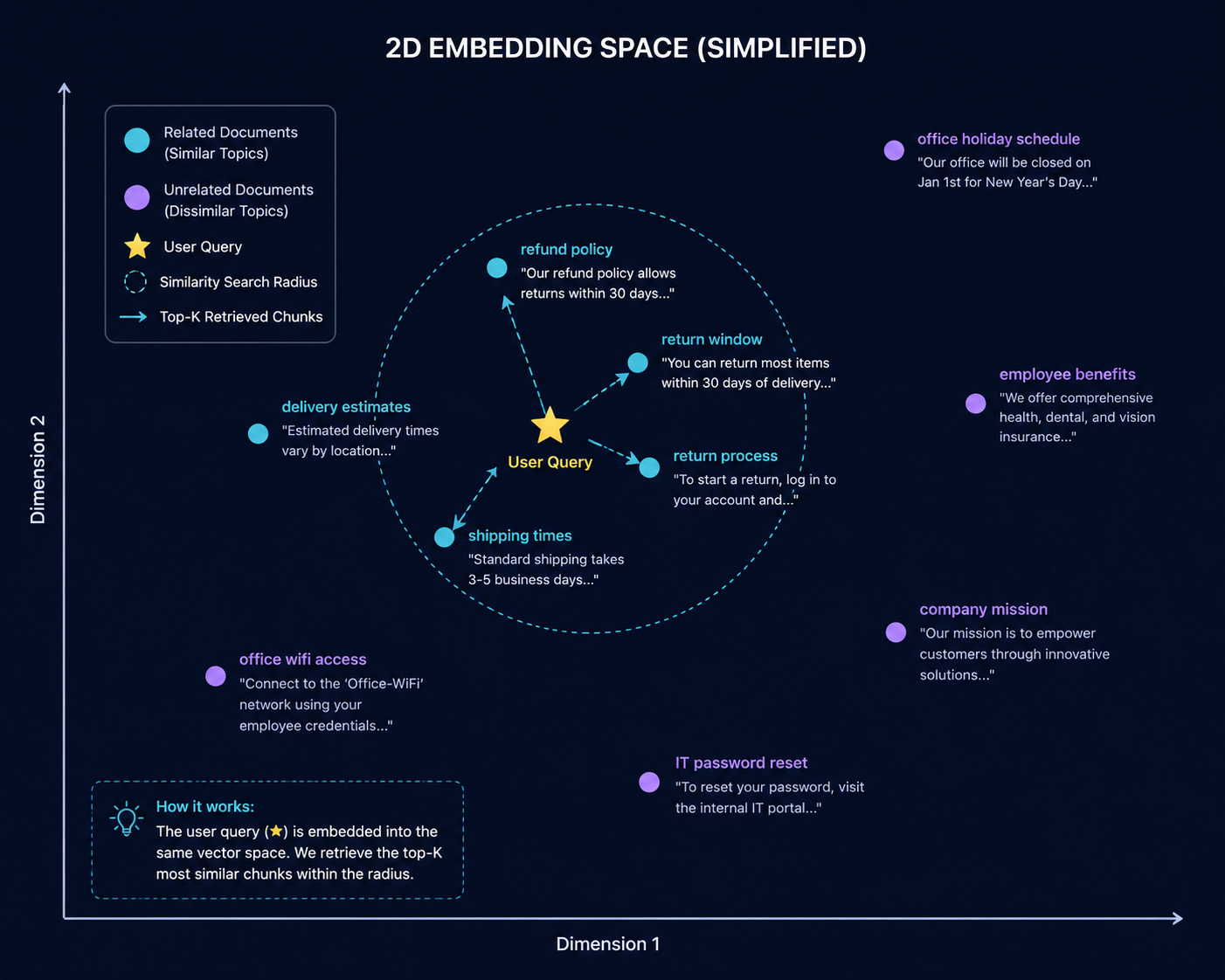
Diagram note: Depict a 2D scatter plot representing a simplified embedding space. Plot a cluster of dots labeled with short document snippets (e.g., "refund policy," "shipping times," "return window") positioned close together because they are semantically related. Place unrelated snippets (e.g., "office holiday schedule") farther away. Add a distinct star-shaped marker labeled "User Query" landing near the "refund policy" cluster, with a dotted circle around it representing the similarity search radius, and arrows pointing from the star to the nearest 3-4 dots to represent the top-K retrieved chunks. Use a dark navy background with cyan and violet dot colors to match a modern data-visualization style.
This kind of visual matters more than it might seem. Most RAG failures are not bugs in the code, they are failures in this retrieval step: the query star landing in the wrong neighborhood, or the nearest neighbors not actually being useful.
Common Scenarios Where RAG Works Well
RAG earns its popularity in specific, well-suited scenarios:
Internal knowledge bases and support docs, where answers change often and must stay accurate to the source.
Customer support bots that need to quote exact policy details instead of paraphrasing from memory.
Legal and compliance search, where citing the exact clause matters more than fluent prose.
Codebase-aware assistants that answer questions about a specific repository instead of generic programming knowledge.
In each case, the underlying data is too large to fit in a single prompt, changes too often to bake into a fine-tuned model, and needs to be traceable back to a source.
Why RAG Sometimes Gives Incorrect Answers
This is the part most tutorials skip. RAG reduces hallucination, it does not remove it, and it introduces entirely new failure points of its own.
Poor Retrieval and Missing Context
The single most common cause of a bad RAG answer is not the LLM at all, it is retrieval. If the vector search returns chunks that are only loosely related to the question, the model is left generating an answer from irrelevant material. A user asking "what is our refund policy for international orders" might get chunks about domestic refunds only, if the embedding model did not weight "international" heavily enough. The model then either guesses or answers a slightly different question than the one asked, and the person reading the answer has no way to tell the difference.
Poor Chunking and Its Impact on Responses
Chunking decisions made months before a user ever asks a question quietly determine the ceiling of answer quality. Chunks that are too large dilute relevance, since a 2,000-word chunk might contain one useful sentence buried among nine hundred irrelevant ones. Chunks that are too small strip away necessary context, cutting a table in half or separating a rule from its exception. A poorly placed chunk boundary can literally split a sentence like "returns are accepted within 30 days, except for electronics" right down the middle, and the retrieval system might only surface the first half.
Context Window Limitations
Even with perfect retrieval, there is a hard ceiling: the LLM's context window. If your retrieved chunks, combined with the system prompt and conversation history, exceed that limit, something has to be cut or summarized, and it is often the least recently added content that gets dropped first. Stuffing too many chunks into the prompt "to be safe" also backfires: models tend to pay less attention to information buried in the middle of a very long context, a well-documented effect sometimes called the "lost in the middle" problem.
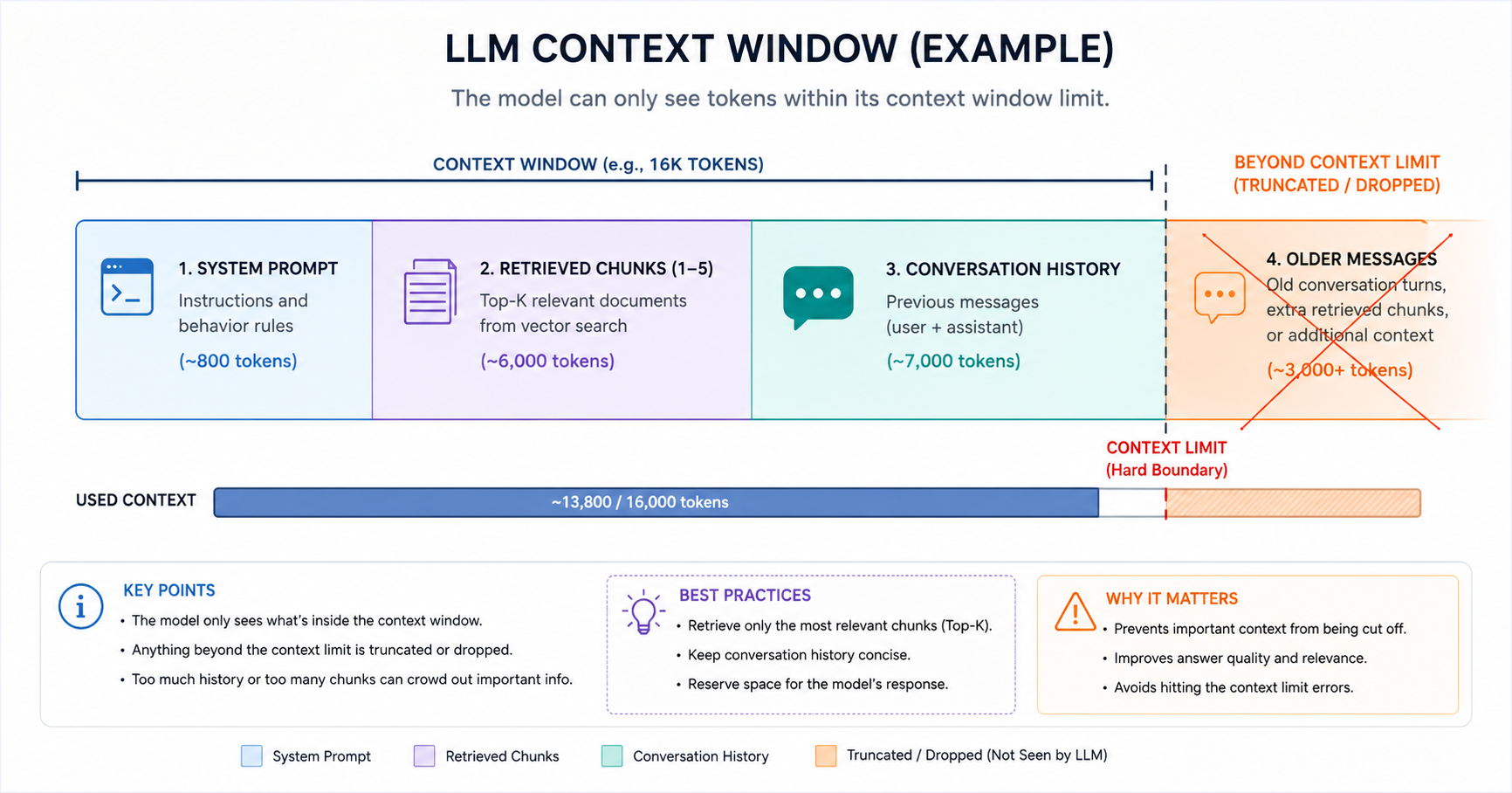
Diagram note: Draw a horizontal bar representing the LLM's total context window, divided into labeled segments: "System Prompt," "Retrieved Chunks 1-5," and "Conversation History." Show the bar filling up and overflowing past a hard boundary line labeled "Context Limit," with the overflowing segment shown fading out or crossed with a red X to represent truncated or dropped content. Use a warning-orange accent on the overflow section against the otherwise cyan-indigo palette.
Hallucinations Even With RAG
RAG lowers the odds of a hallucination but does not eliminate them. The LLM can still misread retrieved context, blend two different chunks into a single incorrect statement, or answer confidently even when told to say "I don't know." Grounding a model in real text does not guarantee the model will use that text correctly. This is why production RAG systems increasingly add a verification step, such as checking the generated answer against the retrieved sources before showing it to the user.
Keeping Knowledge Bases Up to Date
A RAG system is only as current as its vector database. If the underlying documents change but nobody re-runs the embedding pipeline, the system will confidently serve outdated information, sourced from a document that technically still "matches" the query but no longer reflects reality. Keeping a knowledge base fresh requires an ongoing pipeline: detecting document changes, re-chunking, re-embedding, and re-indexing, not a one-time setup step.
Good Retrieval vs Poor Retrieval
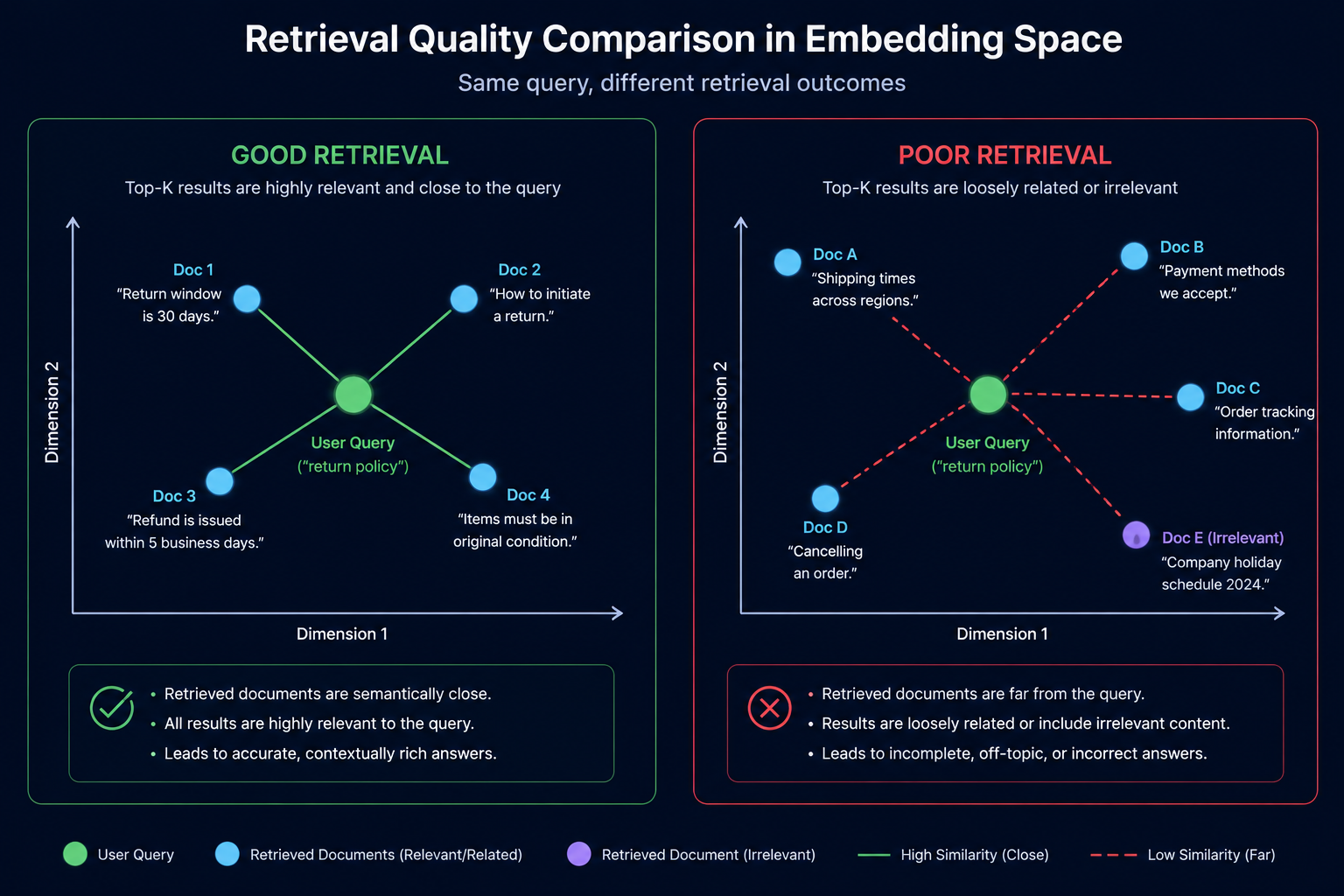
Diagram note: Split the image into two side-by-side panels. Left panel, labeled "Good Retrieval," shows a query dot surrounded tightly by 4 highly relevant document dots, all connected with solid green lines. Right panel, labeled "Poor Retrieval," shows a query dot with 4 loosely related document dots scattered farther away, connected with dashed red lines, and one clearly irrelevant dot mixed in. Keep both panels on the same dark background for direct visual comparison.
When RAG Is Not the Right Solution
RAG is not the answer to every knowledge problem. It tends to be the wrong tool when:
The knowledge needed is small enough to fit directly in a prompt, in which case retrieval adds latency and complexity for no real benefit.
The task requires reasoning or calculation rather than factual lookup, since retrieval does not make a model better at math or logic.
The data changes so fast that keeping the index fresh becomes a bigger engineering problem than the one RAG was meant to solve.
Deep, precise behavior change is needed, such as adopting a very specific tone or internal terminology throughout, which is often better handled by fine-tuning than by retrieval.
Best Practices for Publishing High-Performing Technical Content on Hashnode
Lead with the problem, not the tool. Readers click on "why RAG fails" far more than "how to use vector databases." Frame the article around a pain point before introducing the solution.
Break up code with real explanation. A wall of code with no surrounding narrative loses readers fast. Explain the "why" before and after each snippet, not just the "what."
Use diagrams as checkpoints, not decoration. Place a visual right after a concept that is hard to hold in your head purely as text, like context window overflow or chunk boundaries. It gives the reader a moment to consolidate before moving on.
Summary
RAG is a genuinely useful pattern: it lets a general-purpose LLM answer questions using knowledge it was never trained on, without the cost of fine-tuning. It shines in support systems, internal search, and any scenario where answers need to be current and traceable.
But it fails in specific, predictable ways: retrieval that misses the right chunks, chunking decisions that quietly strip context, context windows that overflow or bury information in the middle, hallucinations that persist despite grounding, and knowledge bases that go stale without anyone noticing. None of these are reasons to avoid RAG. They are reasons to design it deliberately, test it against real queries, and stay honest about what it can and cannot guarantee.
The next time someone says "we added RAG so it won't hallucinate anymore," you now know exactly which question to ask back.
About the author
Hello :) I’m Rajarshi Chakraborty, a proactive, result-oriented STEM undergraduate majoring in Computer Science & Engineering at Techno Main Salt Lake, belonging to the class of 2027. As an aspiring Software Development Engineer (SDE/SWE/SRE), I am passionate about driving technological innovation, streamlining processes, and delivering high-impact solutions. I excel in problem-solving, critical thinking, and strategic decision-making, with a focus on agile methodologies and cross-functional collaboration. With a strong foundation in data structures, algorithms, and full-stack development, I am committed to continuous learning, performance optimization, and scalable architecture design. My technical expertise includes end-to-end development, code optimization, and software lifecycle management, ensuring robust, secure, and efficient applications. My interests lie in Gen-Agentic AI and Machine Learning , where I aim to apply predictive analytics, automation, and data-driven decision-making to enhance business intelligence and improve operational efficiency. I am actively seeking challenging roles in dynamic, growth-oriented environments where I can contribute to mission-critical projects, engage in transformational initiatives, and work alongside industry leaders. My goal is to drive measurable business outcomes, foster innovation, and advance my technical and leadership capabilities.
Comments
Join the discussionNo comments yet. Be the first to comment.
